 9ddd66ce85
-----BEGIN PGP SIGNATURE----- iQGzBAABCgAdFiEEQdXtVV7q1ssY2Q83r1Gc0Q2cMgwFAmkCUNcACgkQr1Gc0Q2c MgyQhAwApawVR09HJE6CWchHqCDj6a+m//ZWkM+UfFP3YaAHqkLzp+2L/FF0ZBKu dRgDK1ma7kdJXaBX6BF/uebc6jcxkF7lO2ZAt2Sm7IwDP4aqzl54LmG/efTLdGIJ SePpVA39abPnY4LlOOJjYyIzJaELtbG93JJ4nL3M3PVd8mAAKFo7P92Nn7g9XFPu MeX4CWBXCQUnoP94bEUIYK2+HMJ3BYhhssbfPIJXknIcZ8CG4X2+zduAXpBIIJ75 Xw4WyypJ6HCKNk7sOKoxoT5YhXbrZ19WFhgp2kcd7lO6DczKjiRDJ9l2KTMh507n t2t06UevOf+Kl+9zHFy6BiHBoGmicsvRxlGwJzBUQAKv4i7rSkQEznVoHGBsv4/Q K6o6RO6eR3NxE+UwFKNt1g4PzNvf0pRQpE2qrG0rf6bVm+fyY3CKxu+QWjvqfrqI ZSuUUMaBaaRZ2sVUg5+o6fK2Vtsrt07uOYcqBYbgo76uyWLXFmmSzWUXYAbyAAT2 RuLwLys2 =9fLi -----END PGP SIGNATURE----- gpgsig -----BEGIN PGP SIGNATURE----- iQGzBAABCgAdFiEEQdXtVV7q1ssY2Q83r1Gc0Q2cMgwFAmkCUNkACgkQr1Gc0Q2c Mgxc1QwA18+YOrJUmISQRYTI0kOKWTJx1fGnkcGtLXvtkng9hB8Rn1VQ2Ik5om+r cudgoTx/OTR/Amv2L73wa2Ze5u+TWattOQUMp0LHYyimGUN5U56kEnpi/Q10PuxN SJuGKvYysojjT+C56ZZU8IUgxrEQyagFk1UCNkOTyR2UsWCBXigACyfSfT7oMvre Rh5BNxcS7Aqc91EftfhrtrRREZSK6o5HbO+CbbFgXcEXZ4dca/Vl44DEVZXYlh/I yPvabvpMXys6rGMNng9ZOcdWkweIE19PN2xKw1oOGMBTWJVP/5Ecwf/hBEVTusD/ 0KWvUERvrp2Tk7WjsoC6lzsrKCn7jSy0P2+OgsoQiZKb47joxl0nzI9YEqZLhqRL 30BQx8u/j4RBA/KsK5PcjrVhS7fbXKcRMbtFdIy/TBAuDwrZzudAArzMePhLPguM bsxMSafiFg90QOnlex0xhCdZuTkRiuuLKA9xukJyZuxuJ+Jv2PKtAqXq+gBYvZH6 ch/b5xnV =/QYr -----END PGP SIGNATURE----- Merge tag '4.2.3' into develop 4.2.3 |
||
|---|---|---|
| .github | ||
| app | ||
| art | ||
| crypto | ||
| database | ||
| fastlane | ||
| gradle/wrapper | ||
| icon-pack | ||
| LICENSES | ||
| src/libre/fastlane/metadata/android/en-US/images | ||
| .gitignore | ||
| build.gradle | ||
| CHANGELOG | ||
| Gemfile | ||
| Gemfile.lock | ||
| gradle.properties | ||
| gradlew | ||
| gradlew.bat | ||
| LICENSE | ||
| README.md | ||
| settings.gradle | ||
Android KeePassDX
 Lightweight password safe and manager for Android, KeePassDX allows editing encrypted data in a single file in KeePass format and fill in the forms in a secure way.
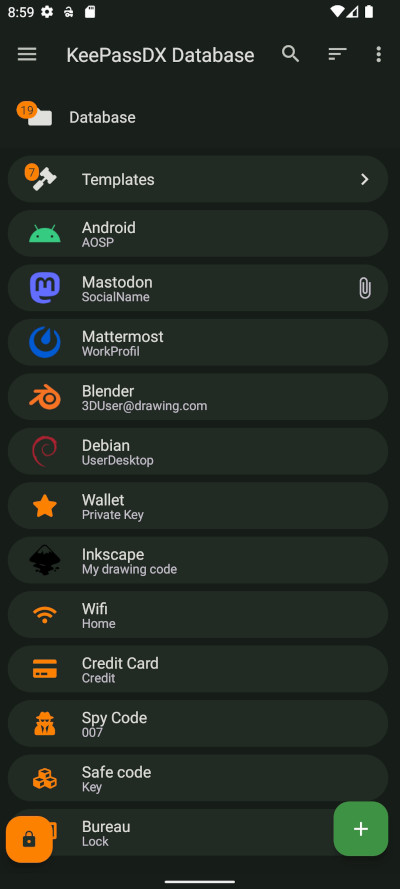
Features
- Passkeys for authentication and local storage of private keys.
- Biometric recognition for fast unlocking (fingerprint / face unlock / …).
- One-Time Password management (HOTP / TOTP) for two-factor authentication (2FA).
- Autofill for easy form filling with passwords.
- Magikeyboard to efficiently fill in any field.
- Create encrypted database files.
- Organisation of credentials by entry and in group trees.
- Allows opening and copying URI / URL fields quickly.
- Dynamic templates for each type of entry.
- History of each entry.
- Precise management of settings.
- Material design with themes.
- Support for .kdb and .kdbx files (version 1 to 4) with AES - Twofish - ChaCha20 - Argon2 algorithm.
- Compatible with the majority of alternative programs (KeePass, KeePassXC, KeeWeb, …).
- Code written in native languages (Kotlin / Java / JNI / C).
KeePassDX is open source and ad-free.
What is KeePassDX?
An alternative to remembering an endless list of passwords manually. This is made more difficult by using different passwords for each account. If you use one password everywhere and security fails only one of those places, it grants access to your e-mail account, website, etc, and you may not know about it or notice, before bad things happen.
KeePassDX is a password manager for Android, which helps you manage your passwords in a secure way. You can put all your passwords in one database, locked with a master key and/or a keyfile. You only have to remember one single master password and/or select the keyfile to unlock the whole database. The databases are encrypted using the best and most secure encryption algorithms currently known.
Small print?
KeePassDX is under open source GPL3 license, meaning you can use, study, change and share it at will. Copyleft ensures it stays that way. From the full source, anyone can build, fork, and check whether for example the encryption algorithms are implemented correctly. There is no advertising.
Do not worry, the main features remain completely free.
Optional visual styles are accessible after a contribution (and a congratulatory message (Ո‿Ո) ) or the purchase of an extended version to encourage contribution to the work of open source projects! If you contribute to the project and do not have access to the styles, do not hesitate to contact the author at contact@kunzisoft.com.
Contributions
- Add features by making a pull request.
- Help to translate KeePassDX to your language (on Weblate or by sending a pull request).
- Donate 人◕ ‿‿ ◕人Y for a better service and a quick development of your features.
- Buy the Pro version of KeePassDX.
Download
F-Droid is the recommended way of installing, a libre software project that verifies all the libraries and app code is libre software.
| Source | Status | Version |
|---|---|---|
| Google Play |  |
Free + Pro |
| F-Droid |  |
Libre |
| IzzyOnDroid |  |
Free & Libre |
| GitHub / Obtainium |  |
Free & Libre |
Package authenticity from GitHub
- Download the app from GitHub releases
- Install
apksignerfrom Android Studio - Open the directory where you saved the downloaded file in the Terminal
- Make sure that you have
apksignerinstalled by running:
apksigner --version
- Depending on the APK file you downloaded, run:
apksigner verify --verbose --print-certs -min-sdk-version 24 KeePassDX-*.apk
You should get this output :
Verified using v2 scheme (APK Signature Scheme v2): true
...
Number of signers: 1
Signer #1 certificate SHA-256 digest: 7d55b8af210381aabf960f07e17cf7857b6d2a642ca2da6bf0bdf1b200362f04
...
Signer #1 public key SHA-256 digest: 5d261d3176db1e077b80112824d9390167f3be0561827e42112ed6b71192db81
If it's the case, this means that the APK was well built by the author of KeePassDX.
Frequently Asked Questions
Other questions? You can read the FAQ
Other devices
-
KeePass (https://keepass.info/) is the original and official project for the desktop, with technical documentation for standardized database files. It is updated regularly with active maintenance (written in C#).
-
KeePassXC (https://keepassxc.org/) is an alternative integration of KeePass written in C++.
-
KeeWeb (https://keeweb.info/) is a web version that is also compatible with KeePass files.
License
Copyright © 2025 Jeremy Jamet / Kunzisoft.
This file is part of KeePassDX.
KeePassDX is free software: you can redistribute it and/or modify it under the terms of the GNU General Public License as published by the Free Software Foundation, either version 3 of the License, or (at your option) any later version.
KeePassDX is distributed in the hope that it will be useful, but WITHOUT ANY WARRANTY; without even the implied warranty of MERCHANTABILITY or FITNESS FOR A PARTICULAR PURPOSE. See the GNU General Public License for more details.
You should have received a copy of the GNU General Public License along with KeePassDX. If not, see http://www.gnu.org/licenses/.
This project is a fork of KeePassDroid by bpellin.